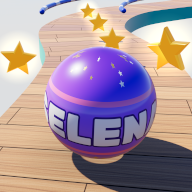
How to play
- Slide your finger left and right to steer. The ball rolls forward by itself.
- Collect the gold stars and roll over the finish line. Finishing a level gives you 10 bonus stars.
- Pass the checkpoints on the way. If the ball rolls off the edge, it comes back at the last checkpoint. Tap the screen to go again. There is no game over.
- Pick a speed on the menu: Slow, Normal or Zoom. You can change it at any time.
- Use the arrows on the menu to play again any level you have reached.
- Tap the pause button at the top left to pause, start the level again or go back to the menu.
Playing on a computer? Steer with ← → or A D, start with Enter or Space, and pause with P or Esc.
Worlds and levels
The levels take turns in five worlds: Sunny Bay, Golden Isles, Frosty Peaks, Cloud Kingdom and Moonlit Bay.
There are 30 levels that build up a little at a time, and the tracks keep coming after level 30. Each new obstacle first appears on its own, moving slowly, before it turns up with others.
The helpers
Super Jump
The ball bounces along by itself in big hops and only lands on safe track.
From level 2Fly
The ball grows wings, flies above the track to collect stars in the sky, then glides down safely.
From level 5Star Magnet
Pulls nearby stars into the ball.
From level 1Bubble Shield
If the ball rolls off the edge, the bubble carries it back onto the track. It works once.
From level 6To get a helper, roll through a helper bubble on the track, or fill the star meter at the top right by collecting stars. A helper that is waiting its turn shows as a small icon under the one that is running.
A helping hand: from level 6, if the ball falls a few times in the same part of a level, the game lends a hand. Rails appear along the edges there, obstacles slow down, and a helper bubble may be waiting for you.
Balls
Tap Balls on the menu to pick a ball. There are 12 to choose from. Selena is yours from the start, and the other 11 are unlocked with the stars you collect in the game, from 15 to 300 stars each. There are no in-app purchases.
Sound
- Tap Sound on or Sound off on the menu to switch sound on or off.
- Sound starts after your first tap on the screen.
- On iPhone the game is quiet in Silent mode. If you hear nothing, check that Silent mode is off (the switch on the side of the iPhone, or the Action button or Control Centre on newer models), then turn the volume up with the buttons on the side.
- If sound stops after a call or an alarm, tap the screen to bring it back.
Saving your progress
Your progress saves by itself on your device: your stars, the levels you have reached, your balls and your settings.
There is no account, so progress is not synced between devices, but it can come back from your own iPhone backup. Deleting the app deletes your progress.
In the web version, progress is kept by your browser for this website. Clearing website data or using a private window removes it, and Safari may clear it if you have not opened the game for a while. Adding the game to your Home Screen helps keep it.
Something not working?
- Close the game completely and open it again.
- Make sure your iPhone has the latest iOS update.
- Still stuck? Email us with your iPhone model, the iOS version, the level and what happened. A screenshot helps.
Contact
Questions, problems or ideas? Email ozhanduyan@gmail.com. See also our Privacy Policy.